Thursday, October 30, 2014

A Better Camera Unlocked v3.27 APK Full


All-purpose, full featured camera for Android!


A Better Cameraplay.google.com.opencam_plus
HDR: vivid colors and rich detail, photos looking like taken with a DSLR and processed with Pro software
  • Panorama: up to 360 degrees, up to 100 MPix
  • Unwanted objects removal: remove objects from the photo with a tap
  • Night mode: capture sharp and noise-free photos in any illumination
  • Group portrait: make everyone smile, fuse faces from series of photos into one
  • Video recording + time lapse
  • Pre-shot: capture what happened before you tap the button
  • Sequence shot: capture the evolution of the dynamic scene
  • Burst and expo-bracketing: Pro functions in your mobile camera
  • Self-timer
  • Zoom
full access to all Camera controls, settings and functions
  • Forget about having dozens of camera apps. A Better Camera does everything you need.
  • A number of top ranked Android camera apps such as HDR Camera+, Night Camera+ and HD Panorama+ have been melted into A Better Camera to provide you with the best, all-purpose, full featured camera app.
  • Video has great features, such as time lapse, and can be used with focus lock, exposure lock and white balance lock!
  • Being open to 3rd party developers, this application aggregates the experience of Android developers community to provide you with the most complete set of the best imaging features ever!
  • Corresponding premium features of A Better Camera are free for users of HDR Camera+, and HD Panorama+.
What's in this version : (Updated : Oct 30, 2014)
  • Night mode corrected
  • time stamp feature added
  • expo metering mode fixed
  • s2/s4 issue corrected- stability fixes
  • Android 5 corrections
  • HTC One X/X+ corrections
  • stability fixes

Required Android O/S : 4.0+


Screenshots :
Download : 7.4Mb APK


IFTTT

Put the internet to work for you.

Turn off or edit this Recipe

Color Splash Effect Pro v1.6.2 APK Full


Color Splash convert photos to gray and let you choose details in color!


Color Splash Effect Pro play.google.com.colorsplasheffect.pro
Color Splash Effect lets you quickly and easily give photos a dramatic look by converting them to black and white, while keeping your chosen details in color. This effect draws the viewers' attention to the colored areas, creating striking images.

Most selective coloring apps give you 2 painting choices: Gray or original color. Color Splash Effect gives you this PLUS the ability to paint nearly ANY color!

The intuitive and responsive multi-touch user interface makes Color Splash Effect amazingly easy and fun to use. Use your finger as a brush to "paint" sections of your image black and white, or to bring back the original color. Zooming in and out using the two-finger pinching gesture allows you to work on details with pixel-accuracy.

Features:

  • Share your edited images on Facebook.
  • Save multiple sessions to resume your work later.
  • Undo any number of accidental brush strokes.
  • An alternative view mode highlights the regions that will remain in color with a red tint. This makes it easier to see and adjust the boundaries between color and black & white regions.
  • Choose from 4 different brushes (hard or soft edged, opaque or transparent)
  • Work in landscape or portrait orientation.
  • Hide the toolbars in full screen mode.
  • Optimized for tablets
  • Pinch zoom(zoom with fingers)
  • Scalable brush size
  • Change colors of your photos
What is more than others
  • Provides highest resolution results.
  • Provides landscape and portrait mode.
  • Two different user interface designs, one for phones and one for tablets.
  • Tablet design provide more space for photos.
  • Most realistic color replace operation unlike other apps.
What's in this version : (Updated : Oct 30, 2014)
Required Android O/S : 2.1+

Screenshots :

Color Splash Effect Pro - screenshot Color Splash Effect Pro - screenshot


IFTTT

Put the internet to work for you.

Turn off or edit this Recipe

Rabbids Big Bang v2.2.1 APK Full

Forget the Milky Way! This is the Rabbids Way!


Rabbids Big Bangplay.google.com.bigbang
Rabbids Big Bang is the first Rabbids physic-based game on mobile devices that lets you pilot a Rabbid in space with the tip of your finger!

BECOME AN EXPERT RABBID PILOT WITH ONLY ONE FINGER!

  • Use a bat to thrust a Rabbid into space and control its trajectory using the jetpack and planet gravity.
  • Play tactically as your fuel will drain when you boost.
  • Don't crash into the planets... unless you're asked to!
COMPLETE 150 SILLY AND CHALLENGING MISSIONS
  • Explore 10 different wacky galaxies each of them offering 15 missions.
  • Bounce on Space Duckies, hit Space Cows, or fly your Rabbid to the Sun.
  • Use our ranking system to progress with your Rabbid and unlock achievements.
UPGRADE & CUSTOMIZE YOUR RABBID
  • Collection coins to upgrade the jetpack and increase its power.
  • Customize your Rabbid with new helmets, bats and more for the funniest looks.
  • Equip your Rabbid with special items and master the galaxy of fun!
THE RABBIDS WACKY HUMOR
Space cows, cheese planets, UFOs… Your Rabbid will have more than one occasion to scream Bwaaah…and so will you!

What's new in this version : (Updated : May 21, 2014)

  • Celebrate Easter with the Rabbids! They've all dressed up especially for you!
  • The Rabbids Galaxy is expanding! Discover Duck Fields, an all-new crazy world including exclusive new planets: Stasis, Turnippos, Lettus, Stanley, Bali, Balo, Sebon, Sebum and Caseus.
Required Android O/S : 2.3.3+

Screenshots :

Rabbids Big Bang - screenshot

Download : 43Mb APK


IFTTT

Put the internet to work for you.

Turn off or edit this Recipe

Unified Remote Full v3.1.1 APK Full


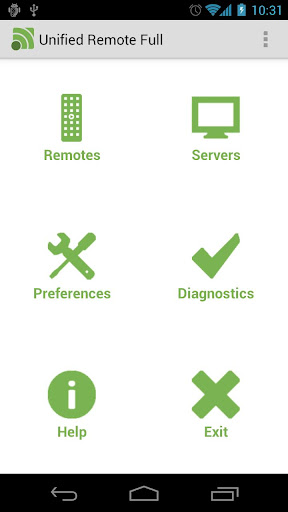
Easily the most feature-filled Android-PC remote. Turns your Android device into a WiFi or Bluetooth remote control for your Windows PC !


Unified Remote Full play.google.com.Relmtech.RemotePaid
Easily the most feature-filled Android-PC remote. Turns your Android device into a WiFi or Bluetooth remote control for your Windows PC. Control your favorite programs, mouse, and keyboard.

DOWNLOAD SERVER V2: http://ift.tt/rf2bMD

SUPPORT
http://unifiedremote.com/support
http://support.unifiedremote.com/

Please try the free version before you buy the full version. Please let us know if you have any problems upgrading from the free version to the full version.

Features:

  • Custom Remotes
  • WiFi (TCP/UDP)
  • Bluetooth
  • Easy server and app setup
  • Comprehensive server manager
  • Automatic server detection
  • Clear connection troubleshooting
  • Custom/Android keyboard support
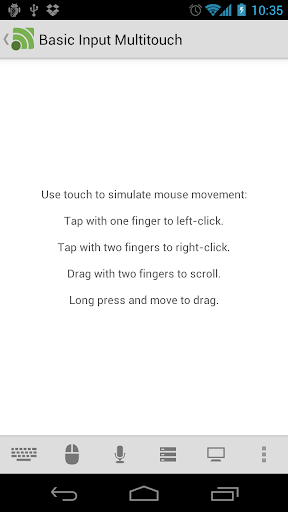
  • Single/Multi touch mouse
  • Hardware volume control
  • Quick Switch using swipe gestures
  • Quickly change servers
  • Auto-pause media for phone calls
  • Homescreen shortcuts to remotes
  • Wake On Lan
  • Server password protection
  • 256-bit AES encryption
  • Voice commands
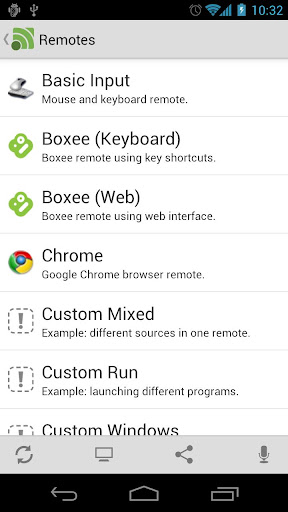
Free Version Features:
  • Basic Input
  • File Manager
  • Keyboard
  • Media
  • Power
  • Slide Show
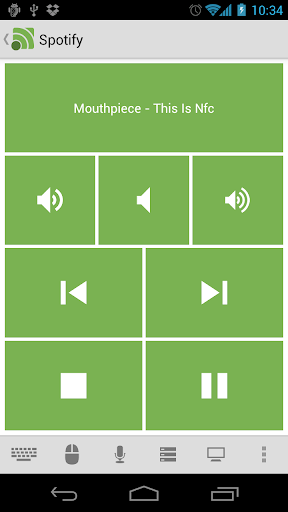
  • Spotify
  • Start
  • Task Manager
  • Windows Media Center
  • Windows Media Player
  • VLC (Keyboard)
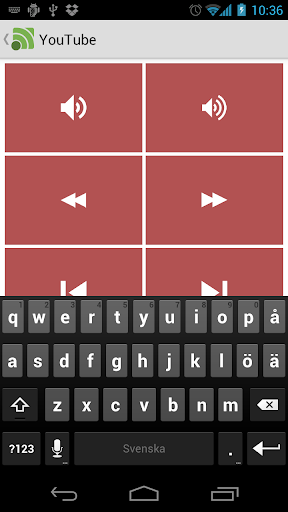
  • YouTube
Full Version Features:
  • Custom Remotes
  • Boxee (Keyboard)
  • Boxee (Web)
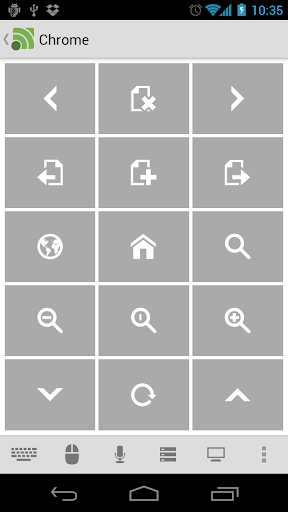
  • Chrome
  • Firefox
  • foobar2000
  • Hulu Desktop
  • Hulu Web
  • Internet Explorer
  • iTunes
  • J River Media Center
  • Monitor
  • Media Portal
  • MediaMonkey
  • MPC HC
  • Netflix
  • Opera
  • Pandora
  • Picasa
  • PowerPoint Advanced
  • PowerPoint Basic
  • Send Text
  • Spotify Advanced
  • Tellstick
  • USB-UIRT Helper
  • Winamp
  • Windows Photo Viewer
  • VLC (Web)
  • XBMC (Keyboard)
  • XBMC (Web)
  • XBMC Media
What's in this version : (Updated : Oct 5, 2014)
Required Android O/S : 1.6+

Screenshots :


Download : 1Mb APK


IFTTT

Put the internet to work for you.

Turn off or edit this Recipe

Battery Widget Reborn v2.0.14 APK Full


Battery Widget? Reborn!


Battery Widget? Reborn! Pro  play.google.com.reborn.pro
Application features
For full info about app visit http://ift.tt/13cX5Hw
This app provides following functionality:

Battery widget

  • circle battery level indicator indicator perfectly fits pure Android design
  • resizable on Android 4.x+
  • support for both main and external dock battery (Asus Transformer only)
Basic battery info
  • Battery Info
  • Shortcuts to Power-Summary/Background Sync/Wifi/BT Settings
Status bar notification of battery status
  • multiple icon styles
  • prediction (estimation) how long battery lasts
  • customizable texts in notification area (estimated time left, voltage, temperature, battery health)
Power saving functionality
  • automatic airplane mode during the night (simple but powerful battery saver functionality)
Charging and discharging chart

Extended notifications support for Jelly Bean phones

  • optional charging and discharging chart
  • power related toggles:
  • Wifi
  • Bluetooth
  • Background Sync
  • Airplane mode
  • customizable notification priority
Holo themes interface on all phones with Android 2.3+

Specific HW vendor support

  • supports Motorola 1% increment
  • supports Asus Transformer secondary (dock) battery
Installation and operation notes
  • Task Killer or Task Manager may affect this app. Please don't use them if app does not work as expected
  • App is highly optimized and DOES NOT drain you battery
  • Known issues are at http://ift.tt/U1wLrw you can prioritize bug fixes and enhancements there by voting
  • Frequently asked questions are at http://ift.tt/U1wNPY, look there before sending support request
  • Due to the limitation of the Android platform, homescreen widgets will NOT be available if application is moved to SD card.
  • Some devices indicate battery level every 10% due to their kernel design (known ones are: most Motorola devices including Droid and Atrix series, Samsung Moment series). Try to use Motorola 1% hack feature if your phone is among these devices
  • In Android 4.0, the system may shrink and dim level indicator icons in status bar.
UI is more or less translated to German, Chinese, Dutch, Polish, English, French, Czech, Spanish, Italian, Portuguese and Russian.

What's in this version: (Updated : Oct 29, 2014)
  • Minor UI polishing
  • Scrolling performance hopefully improved
  • Sidebar menu animation
  • Longpress on notification to configure (Android 5 only)
 Required Android O/S : 2.3+

Screenshots :


Download : 6Mb APK


IFTTT

Put the internet to work for you.

Turn off or edit this Recipe